

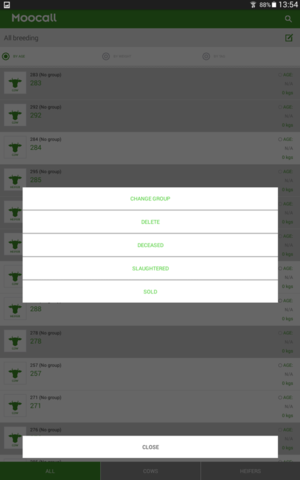
Agora é mais rápido e fácil selecionar e mover vários animais para um novo grupo, registar animais falecidos/abatidos/vendidos ou simplesmente excluir uma seleção de vacas do seu rebanho
Esta funcionalidade é particularmente útil se pretender excluir um determinado número de vacas descartadas da sua visão geral do efetivo antes do início da época de reprodução.
Capítulos do artigo
Como fazer isso?
Clique na lista de vacas correspondente, quer seja uma das listas inteligentes, como "Inseminadas", ou a sua lista completa do rebanho reprodutor.
Para selecionar um animal, pressione e mantenha pressionado o ecrã sobre a vaca/novilha pretendida; o animal aparecerá destacado como abaixo:

De seguida, pode pressionar e segurar várias vacas/novilhas para selecionar aquelas sobre as quais pretende realizar uma ação:
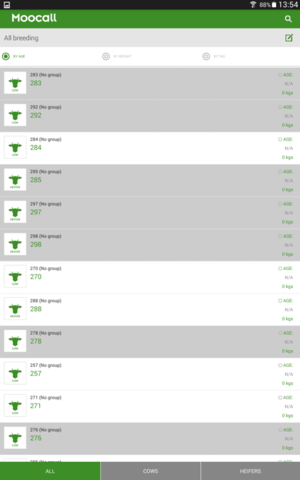
Após selecionar as vacas/novilhas pretendidas, clique no ícone da caixa de edição para visualizar a lista de opções e escolha a ação que pretende realizar:
Para mais informações sobre qualquer um dos tópicos acima referidos ou qualquer outra questão relacionada com a aplicação, contacte um membro da nossa equipa para falar com um dos nossos especialistas em aplicações através do telefone +353 1 96 96 038 ou envie um e-mail para [email protected].
